

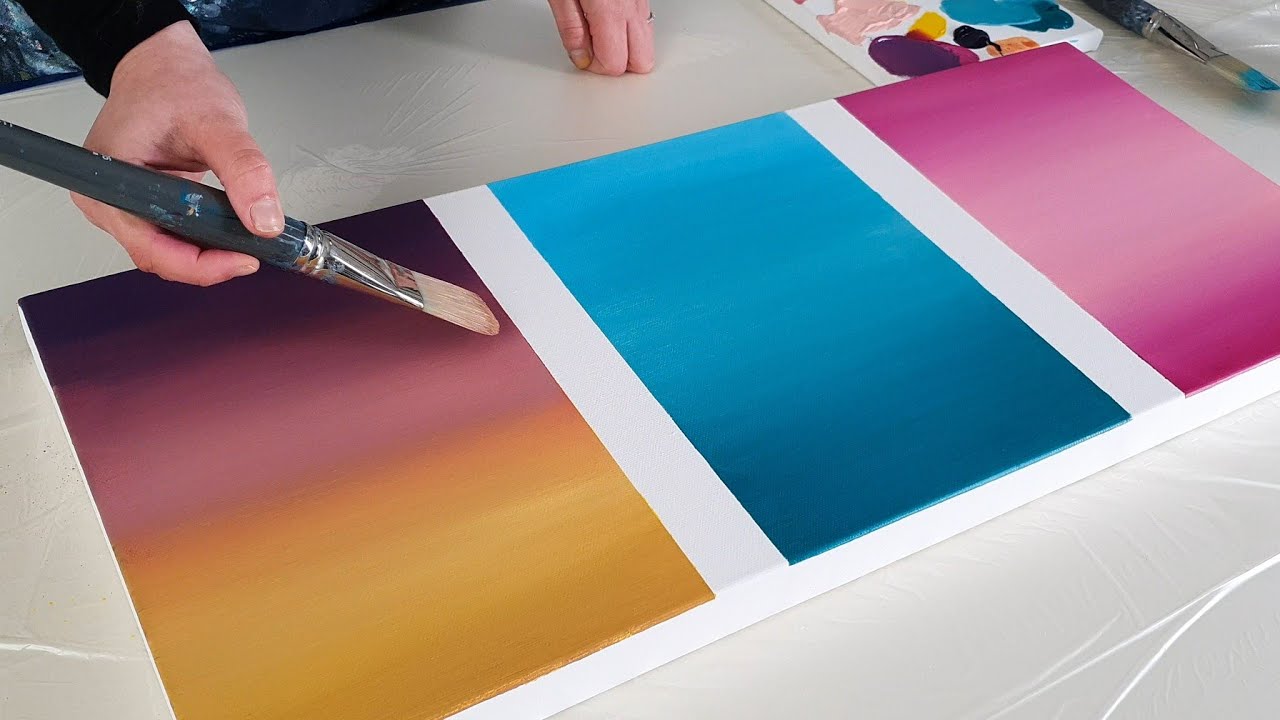
There’s something almost magical about watching two colors merge into something entirely new. Whether you’re designing digital art, painting on canvas, or experimenting with makeup, mastering a color blender can transform your creative process from guesswork into precision.
But what exactly is it? And how do you use it effectively without ending up with muddy, dull results?
Let’s break it all down in a way that actually makes sense—and helps you create smoother, richer, more vibrant blends.
What Is a Color Blender?
At its core, a color blender is any tool, technique, or medium used to combine two or more colors seamlessly. It can exist in different forms depending on your creative field:
- Digital tools (like gradient tools, opacity sliders, or blending modes)
- Physical tools (brushes, sponges, blending stumps)
- Substances (solvents, oils, or mediums used in painting)
The goal is always the same: to eliminate harsh edges and create a smooth transition between colors.
Why Color Blending Matters More Than You Think
Color blending isn’t just about aesthetics—it’s about storytelling. Smooth transitions can create depth, emotion, and realism.
Imagine a sunset. Without blending, you’d see harsh stripes of orange, pink, and purple. But with proper blending, those colors melt into each other, creating a calming, immersive scene.
In real-world scenarios, this skill becomes essential. For example, a graphic designer working on a brand logo needs subtle gradients to make the design feel modern and polished. Without proper blending, the result can look amateurish and flat.
Types of Color Blending Techniques
Different mediums require different approaches. Here are the most common techniques:
1. Gradient Blending
This is the smooth transition from one color to another. It’s widely used in digital design and painting.
2. Layer Blending
Colors are built up gradually in layers, allowing for depth and richness.
3. Wet-on-Wet Blending
Popular in painting, this technique mixes colors directly on a wet surface for soft transitions.
4. Dry Blending
Used with pencils or pastels, this involves rubbing pigments together for a softer finish.
Tools That Help You Blend Colors Better
Choosing the right tool can make or break your blending results.
Digital Tools
- Opacity and flow settings
- Soft brushes
- Gradient maps
Traditional Tools
- Blending stumps (for pencils)
- Soft-bristle brushes
- Sponges and cloth
Mediums
- Linseed oil (for oil painting)
- Water (for watercolor)
- Blending gels (for acrylics)
Comparison of Common Color Blending Methods
Here’s a quick look at how different blending approaches compare:
| Method | Best For | Difficulty Level | Finish Quality | Control Level |
|---|---|---|---|---|
| Gradient Blending | Digital art/design | Easy | Very smooth | High |
| Layer Blending | Painting/drawing | Medium | Rich/deep | Very high |
| Wet-on-Wet | Watercolor/oils | Medium | Soft/organic | Moderate |
| Dry Blending | Pencils/pastels | Easy | Subtle | High |
Tips to Achieve Perfect Blends Every Time
Blending isn’t just about tools—it’s about technique. Here are some practical tips:
Start with the Right Colors
Choose shades that naturally complement each other. Opposites on the color wheel can work, but they require more control.
Work Gradually
Don’t rush. Build your blend in layers instead of forcing it all at once.
Use Light Pressure
Especially in dry blending, heavy pressure can ruin the smoothness.
Clean Your Tools Frequently
Dirty brushes or tools can muddy your colors quickly.
Practice Color Transitions
Try blending between just two colors before moving on to more complex combinations.
Common Mistakes to Avoid
Even experienced creators make these mistakes:
- Overblending: This can result in dull, lifeless colors
- Using too many colors at once: Keep it simple
- Ignoring color theory: Understanding warm vs. cool tones is key
- Applying uneven pressure: Leads to patchy results
I remember struggling with this early on—no matter how much I blended, my colors looked muddy until I realized I was overworking them.
How Color Blending Enhances Creativity
When you master blending, you unlock new creative possibilities:
- Realistic shading in portraits
- Dynamic backgrounds in digital art
- Professional-grade designs
- Seamless transitions in UI/UX
It’s not just about making things look better—it’s about expressing ideas more effectively.
A Smarter Way to Approach Blending
Instead of thinking of blending as just mixing colors, think of it as controlling light and depth.
Every blend you create should answer one question: What feeling or effect am I trying to achieve?
This shift in mindset changes everything. Suddenly, you’re not just blending—you’re designing an experience.
Read More: Puzutask com Review: Legit or Risky Platform Guide
Conclusion
A color blender—whether it’s a tool, technique, or medium—is an essential part of any creative toolkit. From digital design to traditional painting, the ability to merge colors smoothly can elevate your work from average to exceptional.
By understanding different methods, using the right tools, and practicing consistently, you can achieve blends that look natural, vibrant, and professional.
The key is patience. Great blending doesn’t happen instantly—but once you get it right, the results are worth every second.
FAQs
What is the easiest way to blend colors for beginners?
Start with gradient blending or dry blending. These methods are more forgiving and easier to control.
Why do my colors look muddy when I blend them?
This usually happens بسبب overblending or mixing incompatible colors. Try using fewer colors and lighter pressure.
Can I blend colors without special tools?
Yes, you can use basic tools like fingers (for pastels), cotton swabs, or even tissue paper.
Is digital blending easier than traditional blending?
In many ways, yes. Digital tools offer undo options and precise control, but traditional blending often produces more organic results.
How long does it take to master color blending?
It depends on practice, but with consistent effort, noticeable improvement can happen within a few weeks.
